Todo Overview
Todos are suited for managing quick, checkable items such as errands, daily tasks, and temporary reminders. They are a different type from "Tasks":
- Tasks: Oriented toward longer-term projects, typically involving multiple node workflows, progress tracking, and time statistics.
- Todos: Oriented toward checklist items, supporting dates, recurrence, duration ranges, subtasks, and more — much lighter weight.
On the Tasks page, you can switch between "Tasks / Todos" to display and manage each type. Todos typically include: title, tags, date (optional), recurrence rule (optional), and subtasks (optional).
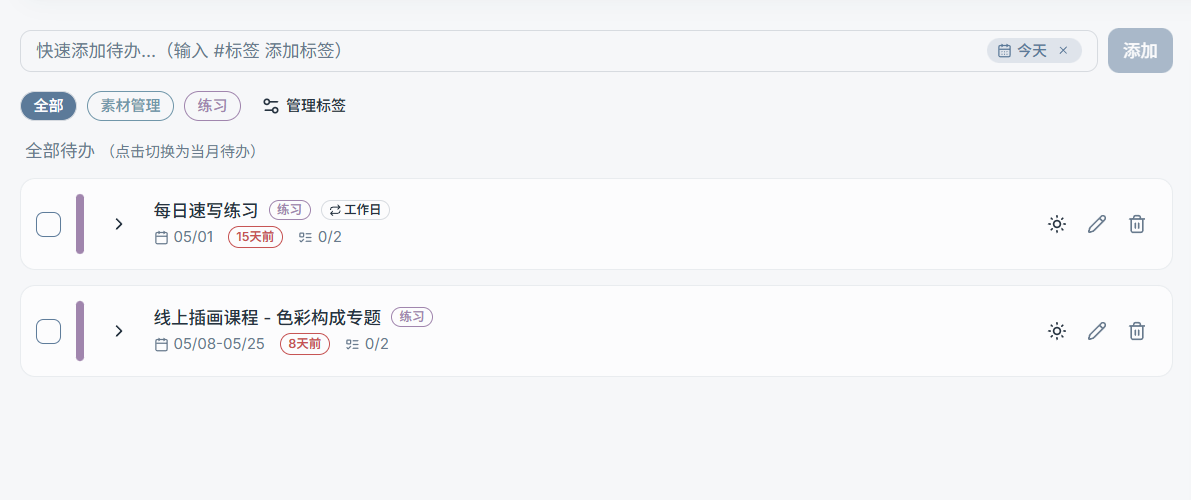
What You Can Do with Todos
- Quick create: Add a todo with a single line of input (supports
#tag) - List mode: Switch between "All Todos / This Month's Todos" (to focus on upcoming items)
- Set a date for a todo: Today / Tomorrow / No Date / Custom Date
- Duration date: Set a start-to-end range (e.g., 02/10 – 02/14)
- Recurrence: Every day / Weekdays / Weekends / Every X days
- Subtasks: Break a todo into multiple smaller steps
- Today's Todos: Add todos (or subtasks) to "Today's Todos" for focused execution
- Tag management: Todo tags and task tags are two separate datasets and are never mixed
Color Rules
A todo's color is determined solely by its first tag:
- Todo color = color of
tags[0] - If there are no tags, the default neutral color is used
What to Read Next (Use the Left Sidebar)
- Quick Add Todos (incl.
#tag) - Dates / Duration / Recurrence
- Todo List & Subtasks (complete, delete, add to Today's Todos, etc.)
- Todo Tags