Todo Tags
IlluTask's "Task Tags" and "Todo Tags" are two separate datasets:
They are managed independently and are never mixed.
1) How Tags Affect Todo Color
The color rule for todos is straightforward:
- Todo color = color of the first tag
tags[0] - If there are no tags, the default neutral color is used
So adding tags to todos is useful not just for filtering — it also affects the visual identification of todos in the list.
2) Tag Names Are Unique (Same Name = Same Tag)
Todo tag names are unique:
- When creating or selecting a tag, tags with the same name are reused
- There will never be multiple todo tags with the same name but different IDs
This prevents issues like duplicate tags and inconsistent colors from building up over time.
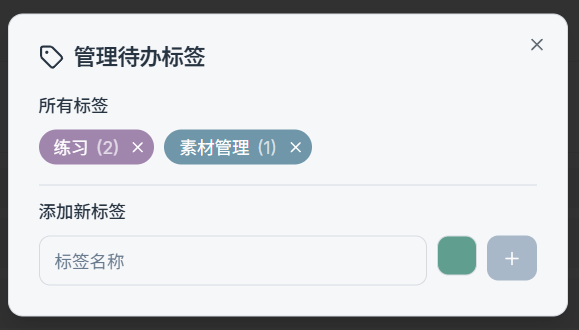
3) Todo Tag Management Window
Click "Manage Tags" above the todo list to open the tag management window. Common features:
- View all todo tags (displayed even if no todos are currently using them)
- Usage count is shown after each tag pill, e.g.:
life (5) - Click the color / edit entry to change the tag color
- When you click "Delete" on the right, a confirmation dialog appears:
n todo(s) are currently using tag xxx. Are you sure you want to delete this tag?
Tip:
- After changing a tag's color, all todos referencing that tag will update their color accordingly (applies when that tag is
tags[0]).