Task Items & Node Actions
Each row in the task list is called a "task item." Items support expanding nodes, timing, completing, pinning, and other common actions.

What a Task Item Contains
The information displayed varies slightly by view mode. Common elements include:
- Color bar: The task's primary color (source depends on your color mode: Category / first Tag)
- Title: The task name
- Tags: The task's tag pills
- Date info: Start/end dates, days remaining, etc.
- Progress: Node completion percentage
- Time / Timer: Logged duration, timer status, etc.
Common Actions (Right-Side Icons)
The icon buttons and their arrangement can be adjusted in "Task Item Button Settings." You may see some of the following:
- Expand / Collapse: View the node list and more details
- Complete / Uncomplete: Quickly toggle the task's completion status
- Pin / Unpin: Pinned tasks generally appear higher in the list
- Timer: Start / stop timing for the task (or a specific node)
- Add to Today's Schedule: Add the task or node to the "Today's Schedule" section
- Edit: Open the edit dialog
- Delete: Delete the task (usually requires confirmation)
- More: Open the more menu (settings, details, batch actions, etc.)
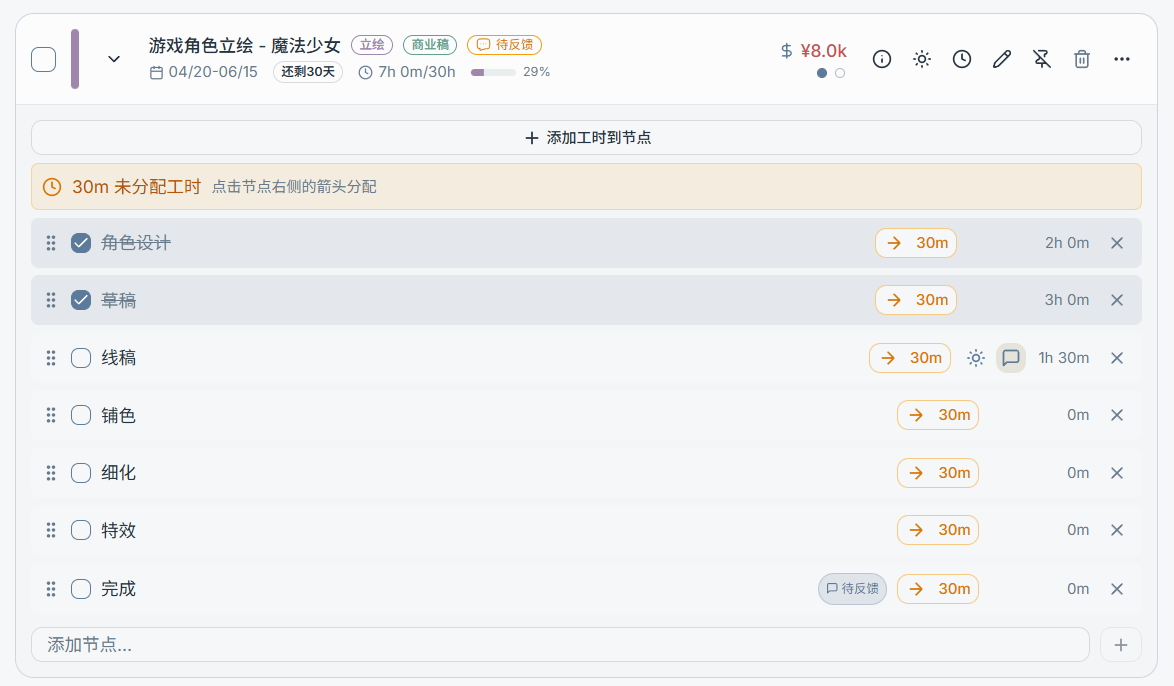
Expanded View: Node List
After expanding a task, you'll see the node list. Nodes represent the task's workflow / steps:
- Check off a node: Marks that step as complete
- Drag to reorder: Adjust the workflow order
- Add a node: Quickly append a new step
- Node timer: If you prefer to log time against specific steps, you can time individual nodes
"Today's Schedule" & Focused Execution
"Today's Schedule" is used to centralize the tasks, nodes, and todos you want to work on today:
- Add tasks or nodes to Today's Schedule
- Start timers or switch targets directly within Today's Schedule
- At the end of the day, you can clear or adjust Today's Schedule
Tip: Put your "1–3 most important tasks for today" into Today's Schedule to avoid information overload from the full list.