Theme & Appearance
Settings → Theme is used to adjust IlluTask's overall visual style and privacy display settings.
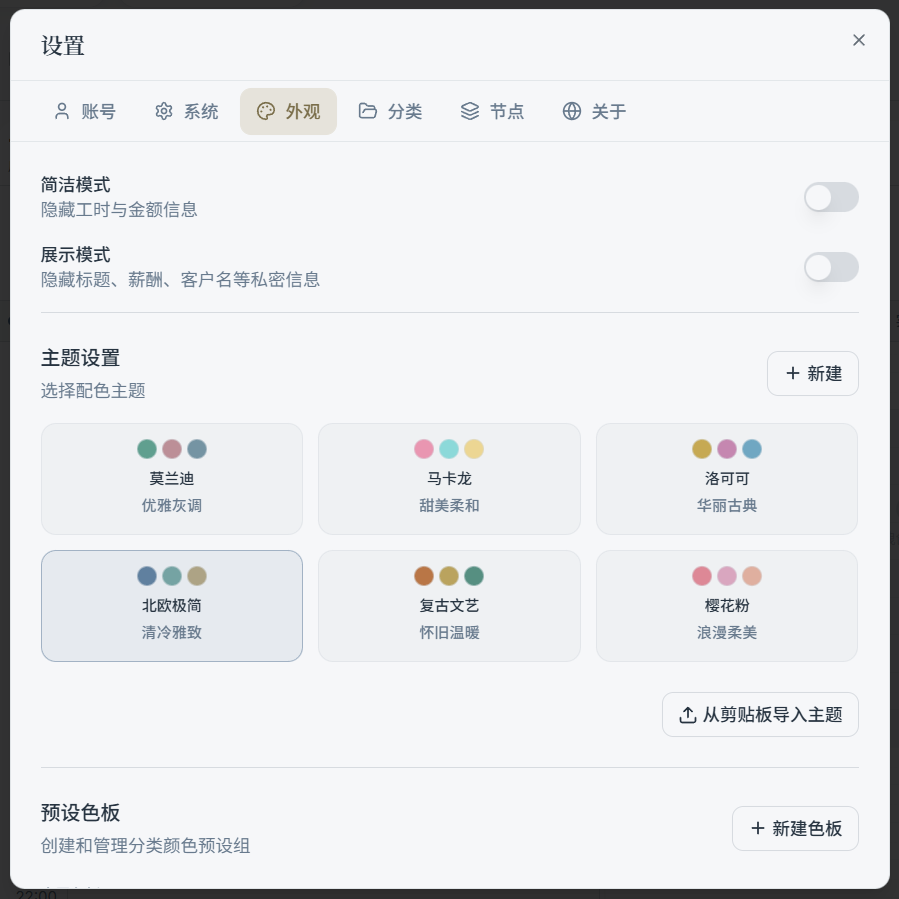
1) Minimal Mode
Minimal mode hides some "amount / hours" information to give the interface a cleaner look. Ideal for users who:
- Don't need to frequently check amounts or hours
- Prefer a less cluttered interface
2) Presentation Mode (Screenshot Mode)
Presentation mode hides private information such as task titles, earnings, and client names. Useful for screen recordings, live streams, and sharing screenshots.
Tip:
- This is a "display layer" toggle — your actual data is not modified.
3) Choose a Theme
Switch between preset themes directly; changes take effect immediately.
4) Custom Theme (Create / Edit / Share)
You can create custom themes and:
- Edit colors (supports color picking / deriving, depending on your version)
- Copy to clipboard to share
- Export to file (for backup / migration)
- Import a theme from clipboard
Tip:
- Start with a preset theme as your base, then make small adjustments — it's much more efficient than building from scratch.
5) Palette (Category Color Presets)
The Theme page also includes "preset palettes" for quickly assigning colors to categories:
- Built-in palettes: Cannot be directly modified, but can be "copied as a custom palette"
- Custom palettes: Editable / deletable, and usable in the category color picker